


Messages
3.81.29K Reviews
App Specs
- Version
- 1.56
- Updated On
- License
- Free
- Downloads
- 5,000,000+
- Developer
- SMS Text Messages
- Categories
- Communication
- Platform
- Android
Screenshots
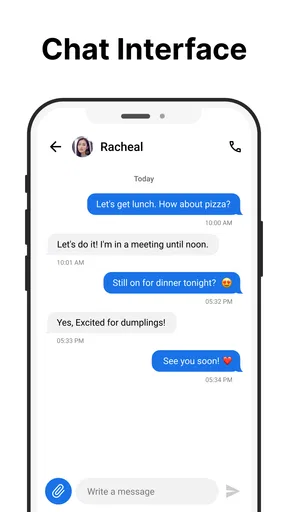
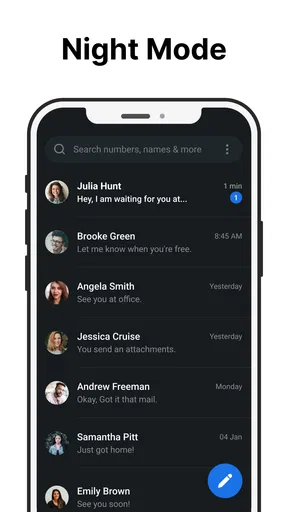
 Analysis by AppCompare
I judge a texting app less by how many extras it can show off than by how well it behaves when I need to get a short message through at the right moment. Messages is aimed at that everyday job: keeping conversations easy to reach without turning a simple text into a complicated task. Its scheduled messaging and smart features make it worth a closer look, especially if you want a straightforward tool for routine communication rather than another social network to manage.
Network conditions are part of the experience, not a small technical footnote. A text sent while I’m moving between places, waiting for a reply, or trying to coordinate a plan can feel very different from one sent at home with a steady connection. I find it useful to think about this app in those real situations: what I need it to do, what depends on connectivity, and how much effort it takes to recover when a message does not go as expected.
Getting Started with Messages
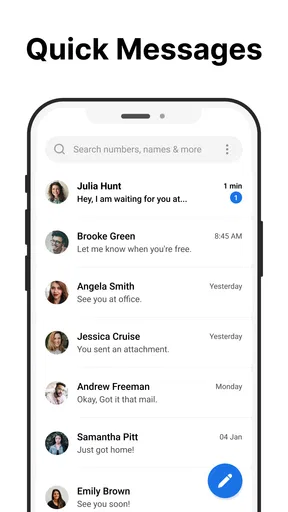
First things first, setting up Messages is a breeze. Once you open the app, it automatically syncs with your contacts, and you’re good to go. The interface is clean and user-friendly, so you won’t find yourself lost in a maze of options. If you’re like me and prefer things straightforward, you’ll appreciate how intuitive everything feels right off the bat.
That simplicity matters when I’m opening a conversation with one hand or trying to send a quick reply between errands. I don’t want to pause and learn a new set of rules just to tell someone I’m running late. The app is a sensible fit for people who primarily want familiar SMS-style communication, and its free price makes it easy to try without committing to a subscription up front. It is published by SMS Text Messages, and its communication focus is clear from the way it keeps the basic task in view.
Features That Stand Out
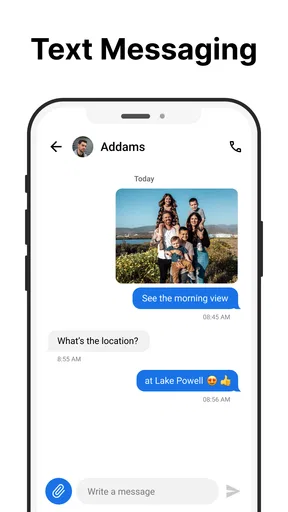
Let’s talk features because Messages has a few tricks up its sleeve. One of the coolest is the ability to send texts over Wi-Fi, which is a lifesaver if you’re in a spotty reception area. Plus, the app supports multimedia messages, so you can send photos, videos, and voice notes without a hitch.
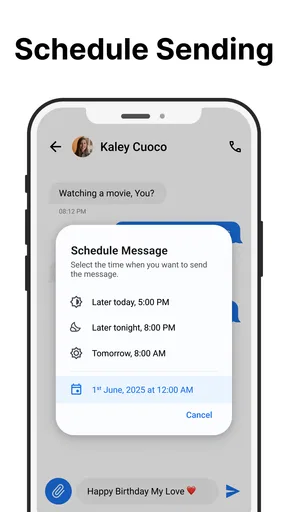
The practical value of scheduled messaging is easy to underestimate until you have a reason to use it. I’d use it to prepare a reminder for a family member while I’m thinking of it, but have it arrive at a more appropriate time rather than late at night. It can also help with recurring life admin, such as sending a note about a pickup or an appointment when I know I’ll be busy later. I would still check the recipient and timing before relying on a scheduled message; a useful reminder can become an awkward interruption if it goes out at the wrong hour.
Another neat feature is the ability to create group chats. Whether you’re planning a party or just staying in touch with the fam, group chats can be a real game-changer. Oh, and did I mention you can customize your chat backgrounds? It’s a small touch, but it adds a bit of personality to your convos.
Worth Reading Before You Choose

EA SPORTS FC Mobile 26 Is a Bigger Football Game, but It Takes Time

Flipboard Shows What News Apps Must Do Beyond the Feed

Switching to Android Auto Means Rethinking Your Driving Routine

Google Calendar Makes a Crowded Week Easier to Manage

Ludo King Makes the Most of the Minutes Between Plans

Baby Panda World Brings Quick Play to Modern Phones, but Its Game Library Feels Busy
Group messages are most helpful when everyone needs the same practical update, such as a change of meeting point or a family arrival time. They are less ideal when a conversation becomes a long-running discussion with many replies: people can miss the key detail among the chatter. My small tip is to keep a group text focused on coordination and send a direct message when a question is really meant for one person. That habit makes the app’s basic format work better without needing a more elaborate group platform.
When the Network Is the Difference
A connection can change what “sent” means in practice. Wi-Fi messaging can be useful when mobile reception is weak, but it is not a magic fix for every network problem: the device still needs a working connection, and the other person’s ability to receive a message depends on their own setup and availability. I would treat it as another route for communication, not as a guarantee that every text will arrive immediately.
For a realistic example, imagine I’m heading to meet a friend and the café entrance is crowded. I can send a quick change of location, then carry on instead of repeatedly checking the conversation. If the message seems delayed, I’d first check whether I have a usable connection and whether the recipient has had time to see it, rather than sending the same update several times. Repeated messages can create confusion if the first one eventually arrives after all.
Large media attachments are a different case from short texts. A brief update is usually the best choice when I need to communicate something urgent; photos or videos may take longer to send, particularly when the connection is inconsistent. If the media itself is not essential, I’d send the important words first and share the attachment when conditions are better. That simple order helps separate the time-sensitive message from the heavier item.
Keeping It Secure
Privacy is a big deal these days, and Messages doesn’t skimp on security. It offers end-to-end encryption, so you can be sure your chats are staying private. That’s a big plus in my book, especially when discussing sensitive topics. No more worrying about prying eyes!
For anything genuinely sensitive, I still recommend checking that the conversation is using the protection you expect before sharing details. I also avoid treating a messaging app as a secure place to store information permanently: a message thread is convenient for conversation, but it is not a substitute for careful handling of private records. This is a useful distinction for anyone deciding whether ordinary texting is enough for their needs.
Integration with Other Apps
One thing I love about Messages is how well it integrates with other apps. Whether you’re sharing a location from Google Maps or sending a playlist from Spotify, it’s all seamless. This kind of integration makes life so much more convenient, especially when you're trying to juggle multiple apps at once.
For me, sharing context is often more useful than sending a bare sentence. A location can prevent a “which entrance?” exchange, while a song can make a conversation feel more personal. Still, I would choose the simplest share option that gets the point across. If a person only needs an address, a clear text may be quicker to read than a collection of links and attachments, particularly when they are on the move.
Using It on the Move
This is the kind of app I’d keep for short, practical exchanges while commuting, walking between appointments, or waiting in a queue. The simple interface helps when I have only a moment to check a reply, and scheduled messaging is useful when I want to prepare something now but avoid sending it at an inconvenient time. I would not use that convenience as an excuse to message while driving; the best workflow is to prepare or read messages when safely stopped.
The app is also a reasonable choice for someone who wants a familiar place for everyday conversations without learning a feature-heavy service. If a household already uses SMS for quick updates, a parent can send a pickup change while another family member can reply without turning the exchange into a group call. For a group that needs shared files, reactions, persistent channels, or extensive collaboration, a dedicated chat service may be a better match.
Connectivity habits matter for data-conscious users, too. Text-only updates are a lighter choice than repeatedly sending large photos or videos, and it is worth considering whether an attachment needs to be shared with everyone in a group. I’d send media when it adds real context, not simply because the option is there. That keeps conversations easier to scan and avoids making every small exchange depend on a larger transfer.
Integration, Alternatives, and Fit
Compared with the messaging app that comes preinstalled on a phone, this one is appealing if its scheduling and smart tools suit the way I handle routine messages. The familiar SMS approach remains its main strength: I can focus on the conversation instead of learning a separate social system. On the other hand, people who rely on richer reactions, broad sticker collections, or elaborate community features may prefer a more feature-packed messaging platform.
It is also worth separating SMS-style use from services built around internet-based accounts. A dedicated chat service can be a better choice when everyone in a group already uses it and wants features beyond ordinary texting. Conversely, if I need a simple way to contact people through familiar phone-based conversations, the lighter approach here makes more sense. The right choice depends less on which app has the longest feature list and more on whether the people I contact will actually use the same tool.
There are a few practical questions I would ask before making it my main messaging app. Will scheduled messages fit my routine, and can I reliably remember to review their timing? Do the people I contact prefer standard texts or another chat service? Am I often sending big media files, where occasional delays could be inconvenient? Thinking through those habits is more useful than choosing an app based on a single feature.
Room for Improvement
Now, I wouldn’t be doing my job if I didn’t mention a couple of areas where Messages could improve. For starters, while the app is great for texting, it doesn’t have the same pizzazz as some other messaging apps when it comes to added features like stickers and GIFs. Sure, you can still send them, but the selection isn’t as vast as some might like.
Another minor gripe is the occasional lag when sending large files. It’s rare, but it can be a bit frustrating when you’re in a hurry. Hopefully, future updates will smooth out these wrinkles.
When something appears to stall, my first move would be to avoid tapping send repeatedly. I’d check the connection, give the transfer a moment, and then look at the conversation before trying again. That is especially important for photos or videos, where a delayed first attempt and a repeated second attempt could leave the recipient with duplicates. If an urgent detail is trapped in a media transfer, I’d send the key information as plain text instead.
The app’s broad reach is reassuring for someone who wants a mainstream communication tool: it has an average rating of 4.0 from around 17,000 ratings and more than 5 million installs. Those figures suggest many people have tried it, but they do not tell me whether its particular workflow suits every phone or every group of contacts. I’d judge it by a short, ordinary trial with the people I message most often.
Who Should Choose It
I’d recommend it to someone who values direct texting, wants scheduling available for planned messages, and does not need a large collection of social extras. It can be especially handy for reminders, family coordination, and short updates that are easier to prepare in advance than to remember at the last minute. Its Everyone content rating also makes it approachable for a broad audience, though parents should still guide children about what they share in any messaging app.
I’d skip it if my daily conversations depend on advanced group-management tools, a deep library of expressive add-ons, or a particular service that all my friends already use. I would also think twice if I regularly send large files on unreliable connections and need them to arrive immediately. In those cases, a different messaging option or a separate way to share the file may be more dependable for the task.
Final Thoughts
All in all, Messages is a solid choice for anyone who values simplicity and functionality. It's not trying to be flashy or over-the-top, and that's part of its charm. Whether you're a texting newbie or a seasoned pro, this app has got you covered with the essentials and then some. So, if you haven’t already, give it a whirl. You might just find it becomes your new favorite way to stay in touch.
The app is free to download, and its current version is 1.55, with Android 7.0 or later required. In-app purchases are offered at $49.99 per item, so I’d look at the purchase details before buying anything and decide whether the free experience already covers what I need. It was released on August 17, 2023, and the combination of a simple texting focus and optional paid items makes it sensible to try first rather than assume extra purchases are necessary.
Ready to start texting up a storm? You can download Messages from the link provided on our site and see for yourself why it's a staple on smartphones everywhere. Happy texting!
Pros
- User-friendly interface
- easy to navigate.
- Seamless integration with contacts.
- Supports multimedia sharing efficiently.
- Offers customizable notification settings.
- End-to-end encryption for security.
Cons
- Limited support for third-party apps.
- No message scheduling feature.
- Lacks advanced search options.
- Occasional syncing issues reported.
- No built-in spam filter available.
FAQs for Messages
What features does the Messages app offer?
The Messages app provides a wide range of features, including text messaging, multimedia sharing (photos, videos, and audio), group chats, and rich communication services (RCS) for enhanced messaging. It also supports emojis, stickers, and GIFs to make conversations more engaging. Additionally, it offers end-to-end encryption for secure communication.
Is the Messages app secure to use?
Yes, the Messages app prioritizes user security with features like end-to-end encryption for one-on-one conversations, ensuring that messages are protected from third-party interception. It also provides options for blocking unwanted contacts and reporting spam, enhancing user safety and privacy during messaging.
Can I use the Messages app for group chats?
Absolutely, the Messages app supports group chats, allowing you to communicate with multiple contacts simultaneously. You can easily add participants, share multimedia content, and utilize emojis and stickers to enrich your conversations. This feature is perfect for coordinating plans or staying in touch with family and friends.
Does the Messages app require an internet connection?
While standard SMS messaging does not require an internet connection, many of the app’s features, such as multimedia sharing and RCS messaging, do need a Wi-Fi or mobile data connection. To fully utilize these features, ensure you have a stable internet connection on your device.
Is the Messages app compatible with both Android and iOS devices?
The Messages app is primarily designed for Android devices, with RCS features available on compatible Android phones. However, it can still send SMS messages to iOS devices. For iOS users looking for similar functionalities, Apple's iMessage is a comparable option, offering seamless communication within the Apple ecosystem.


